

ChatGPT Image Generation Prompt
ChatGPT image generation is becoming a useful tool for bloggers, YouTubers, Instagram creators, students, and business owners. It allows users to turn their ideas into images by describing what they want in simple English. You do not need professional graphic design skills or expensive editing software to get started. Whether you want to create realistic portraits, attractive posters, product advertisements, or blog featured images, ChatGPT can help you bring your creative ideas to life.
One of the best things about AI image generation is its flexibility. You can create a new image, improve an existing picture, change the background, experiment with different styles, and make adjustments using follow-up instructions. In this article, you will learn how ChatGPT image generation works, how to use it, its benefits and limitations, and how it can help you create better digital content.
What Is ChatGPT Image Generation?
ChatGPT image generation is an AI-powered feature that creates images from written descriptions. Instead of drawing an image manually or searching for the perfect stock photograph, you can describe your idea and let the AI generate a visual result.
For example, you can ask ChatGPT to create a realistic photograph of a young man standing on a mountain during sunset, a modern smartphone advertisement, or a colorful festival poster. You can describe the background, lighting, colors, composition, and overall appearance to guide the result.
This technology is useful for people who regularly create online content. Bloggers can make featured images for their articles, YouTubers can develop thumbnail concepts, and businesses can create advertising visuals. Students and teachers can also use AI-generated images to make presentations and educational materials more interesting.
ChatGPT Images supports image creation and editing, although available features and usage limits may vary depending on your account and the current product experience.
How Does ChatGPT Image Generation Work?
AI image generation uses machine-learning technology to interpret your instructions and produce a new visual result. When you describe an image, the system processes the details in your request and attempts to create a picture that matches your requirements.
For example, consider an image of a red sports car driving through a city at night. You might want wet roads, colorful lights, reflections, and a cinematic appearance. By including these details in your description, you give the image generator a clearer idea of what you expect.
The quality of the result depends on several factors, including the clarity of your instructions, the complexity of the image, and the capabilities of the image-generation model. A simple scene with one main subject may be easier to control than a crowded scene containing many people and objects.
You can also refine the image after it has been generated. If the background is too bright, you can request darker lighting. If the image needs more space for a headline, you can ask for a different composition. This makes image generation an interactive creative process rather than a single request.
How to Generate Images with ChatGPT
Creating images with ChatGPT is straightforward, even if you have never used an AI image generator before.
First, open ChatGPT in your web browser or supported mobile application. Sign in if necessary, and look for the image creation option if it is available in your interface. You can also describe the image you want directly in a conversation.
Next, explain your idea clearly. Mention the main subject, background, colors, lighting, and visual style. For example, if you want a professional product image, describe the product, the studio background, the lighting, and the composition.
Submit your request and wait for the image to be generated. Examine the result and identify anything you want to change. You can ask ChatGPT to modify the background, adjust the colors, change the composition, or improve specific details.
Once you are satisfied with the image, use the available save or download option. Before publishing it, check the image quality, dimensions, and any visible text.
For the best results, make one or two specific changes at a time. This makes it easier to understand which instructions improve the final image.
Popular Uses of ChatGPT Image Generation
ChatGPT image generation can support many different creative projects. Its usefulness depends on your needs, the type of image you want, and how carefully you review the final result.
1. Creating Realistic AI Portraits
AI portraits are popular among people who enjoy photography, digital art, and creative social media content. You can generate portraits with different outfits, backgrounds, lighting styles, and artistic appearances.
For example, you can create a professional-looking profile picture, a cinematic character portrait, or a fashion-inspired image. You can also upload a reference photograph when you want the generated result to follow a particular appearance.
However, maintaining an exact likeness is not guaranteed. If you are using another person’s photograph, make sure you have permission where required and avoid presenting an altered image as an authentic photograph.
2. Designing YouTube Thumbnails
A good thumbnail helps viewers understand the subject of a video quickly. ChatGPT can help you develop thumbnail concepts for technology videos, product reviews, tutorials, gaming videos, and educational content.
You can request a landscape composition with a clear subject, contrasting colors, and enough space for a headline. For example, a technology thumbnail might feature a computer screen, futuristic lighting, and a visual representing artificial intelligence.
For the best results, keep the design simple. Too many objects or too much text can make a thumbnail difficult to understand on a mobile screen. You should also check any generated headline for spelling mistakes before publishing it.

3. Creating Blog Featured Images
Bloggers can use ChatGPT to create images that match their article topics. A technology article might need a futuristic digital illustration, while a travel article could benefit from a landscape image.
Relevant featured images make blog posts more visually appealing and help readers understand the subject. You can maintain a consistent design style across your website by using similar colors, layouts, and visual themes.
For SEO, use descriptive image filenames and meaningful alternative text. Compress images appropriately to support page performance, and ensure that the image adds value to the article. AI-generated images alone do not guarantee higher rankings in search results.
4. Creating Product Advertisements
Online sellers and affiliate marketers can use AI image generation to explore product advertisement concepts. You can create ideas for headphones, mobile accessories, home appliances, fashion products, and other consumer goods.
For example, a headphone advertisement could feature a dark studio background, dramatic lighting, and subtle reflections. A kitchen product advertisement might use a bright background with natural lighting and a clean composition.
When advertising an actual product, make sure the final image accurately represents the item. AI-generated versions may change its shape, features, buttons, or branding. Use the original product photograph when exact accuracy is important.
5. Designing Social Media Graphics
Instagram creators, Facebook page owners, and other social media publishers can use ChatGPT to develop visual concepts for posts, promotional graphics, and Reel covers.
You can choose a vertical composition for mobile content or a square layout for suitable social media posts. A consistent color palette and recognizable design style can help your content look more professional.
Before publishing, check the image dimensions and make sure important subjects are not hidden by platform interface elements. If you need precise text placement, you may find it easier to add the final text using a graphic design editor.
How to Write Better Instructions for AI Images
The quality of your instructions plays an important role in image generation. A vague request gives the AI more freedom to decide what the final image should look like, while a specific description provides clearer direction.
Start by explaining the main subject. Then describe the environment, lighting, visual style, and composition. If the image is intended for a particular platform, mention the required aspect ratio.
For example, instead of requesting a beautiful house, describe a modern white house surrounded by green plants, with warm morning sunlight, a stone pathway, and realistic architectural photography.
You should also explain what you do not want in the image when those restrictions matter. You might request no extra objects, no watermark, or no additional text. These instructions can help guide the result, although they cannot guarantee that every unwanted detail will be excluded.
When editing an existing image, identify which features should change and which should remain unchanged. For example, you might request a new background while asking ChatGPT to preserve the original subject’s clothing and position as closely as possible.
Can ChatGPT Edit Existing Images?
Yes, ChatGPT can help edit existing images. You can upload a suitable photograph and describe the changes you want to make. Depending on the available editing interface, you may also be able to select a particular area for modification.
Common editing tasks include changing backgrounds, adjusting colors, improving lighting, removing or adding visual elements, and transforming an image into a different artistic style.
For example, you might upload a product photograph taken in your home and request a clean studio-style background. You could also ask for improved lighting while preserving the product’s appearance.
However, AI editing can sometimes affect details you did not intend to change. Faces, product shapes, clothing, and background objects may look different after editing. Always compare the edited result with the original, especially when the image will be used for business or commercial purposes.
Benefits of ChatGPT Image Generation
One of the main advantages of ChatGPT image generation is convenience. You can describe an idea in everyday language without learning professional illustration software. This makes the technology accessible to beginners and people who need visual content regularly.
Another benefit is creative flexibility. You can explore different colors, backgrounds, compositions, and visual styles without planning a separate photoshoot for every concept. If an image does not meet your expectations, you can request changes and experiment with alternatives.
AI image generation can also help content creators save time during the early stages of a project. Bloggers can develop featured image concepts, businesses can explore advertising ideas, and YouTubers can test different thumbnail layouts.
Despite these advantages, AI-generated images require human review. Some results may contain inaccurate details, distorted objects, or incorrect text. You should also consider privacy, permissions, copyright, and the relevant terms of service before using images commercially.
Limitations of ChatGPT Image Generation
Although AI image generation is powerful, it is not perfect. Sometimes, the generated image may differ from the description, especially when the scene includes many objects or complicated visual relationships.
Text inside images can also contain errors. If you need an exact headline, price, product specification, or business name, check it carefully before publishing. Adding the final text separately in an editor may be more reliable.
Another limitation is product accuracy. A generated image may look attractive but fail to represent the actual product correctly. For online stores and affiliate marketing, this can mislead customers if the image is presented as an authentic photograph of the item.
Usage limits and feature availability may also depend on your ChatGPT plan. If you need to produce a large number of images, review your account’s current limits before planning your workflow.
Understanding these limitations helps you use AI as a creative assistant rather than assuming every generated image will be ready for publication.
Tips for Getting the Best Results
You can improve your results by following a consistent process. Begin with a clear idea and describe the most important visual details. Generate an initial image, examine it carefully, and request specific improvements rather than changing everything at once.
Choose the correct aspect ratio for your intended use. Landscape images are commonly used for YouTube thumbnails and blog featured images, while vertical images are suitable for many Instagram Reel covers.
Keep your composition focused on one main subject whenever possible. Use clear lighting and color descriptions, and avoid adding unnecessary details that make the scene confusing.
Save successful instructions so you can reuse them for future projects. For example, you might keep separate sets of instructions for blog images, product advertisements, portraits, and social media graphics. This can help you maintain a consistent visual style.
Finally, check every image before publishing it. Look for unwanted text, incorrect product details, visual inconsistencies, and anything that could confuse your audience.
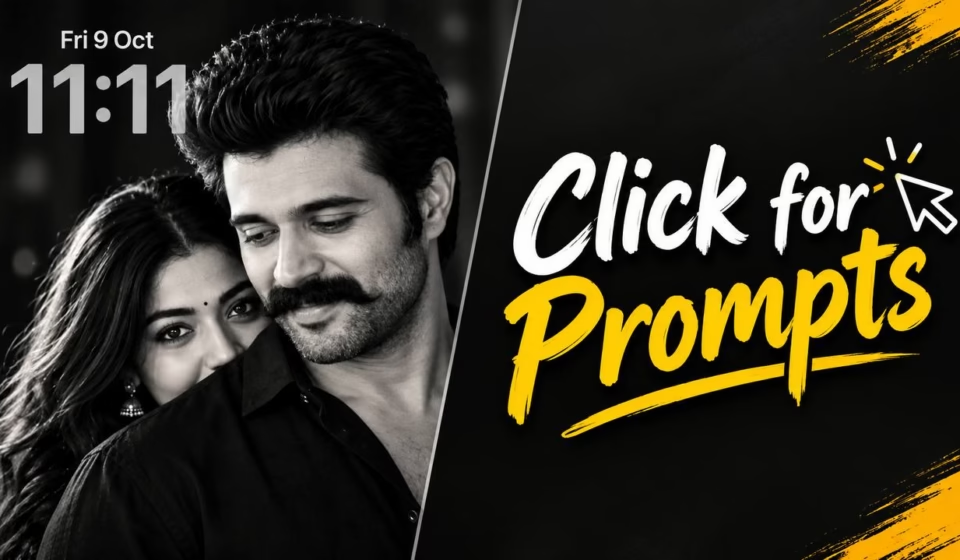
HERE ID THE PROMPT
Create an ultra-realistic black-and-white cinematic portrait of a romantic Indian couple in an intimate, candid moment.
A handsome man in the foreground with voluminous, swept-back dark hair, a thick, perfectly styled curled mustache, light stubble, and a black shirt. A beautiful woman stands closely behind him, resting her face near his shoulder, gazing softly towaei the camora with expressive eyes, long flowing dark hair, a tiny black bindi, and traditional jhumka earrings. The man’s head is sighity tilted downward with a subtle, affectionate smile, while the woman peeks over his shoulder, creating a tender and protective romantic atmosphere.
Tight close-up compiction, natue fatail feefures, realistic slein texture, soot direction ligniting, dep ruch shades, rich geslae tones, shaled deptb of fled, film-grian textetie, high corrett, moody bettlary, profescional portrat photography, timeless Indian romantic film aesthetic, 4K detail, vertical 9:16 aspect ratio. Preserve natural proportions and authentic expressions. No color, no text, no watemark.
Conclusion
ChatGPT image generation is a useful technology for anyone who wants to create digital images using simple written instructions. From realistic portraits and YouTube thumbnails to blog featured images and product advertising concepts, it offers many creative possibilities without requiring advanced design skills.
The key to getting better results is to describe your idea clearly, choose the right composition, and improve the image through specific follow-up instructions. You should also understand the limitations of AI-generated content and review every image before using it publicly.
Whether you are a blogger, YouTuber, student, social media creator, or business owner, you can start experimenting with ChatGPT Images today. With regular practice, you can develop a more efficient creative workflow and produce visuals that suit your content and audience.
Frequently Asked Questions
1. Is ChatGPT image generation free?
ChatGPT offers image-generation access on the Free plan, but usage limits and feature availability can vary. Check your account for the latest limits and options.
2. Can I generate realistic photos using ChatGPT?
Yes. You can request realistic portraits, landscapes, product scenes, and lifestyle photographs. The results may contain visual errors, so review them before publishing.
3. Can I use ChatGPT-generated images on my blog?
Yes, subject to applicable terms, policies, and legal requirements. Make sure the image is relevant to your content and does not misrepresent a real person or product.
4. Can ChatGPT edit my existing photos?
Yes. You can upload an image and request changes to its background, lighting, colors, or other visual details. Some edits may unintentionally affect other parts of the image.
5. What is the best way to get better AI images?
Write clear instructions that describe the subject, background, lighting, style, and composition. Make targeted changes after reviewing the first result, and check the final image carefully before using it.