

Google Flow AI Videos
Artificial Intelligence has completely transformed video creation, and Google Flow AI is quickly becoming one of the most powerful platforms for creators, marketers, educators, and businesses. Built on Google’s latest AI technologies, including Veo 3.1 and Gemini Omni Flash, Flow enables users to generate cinematic videos using simple text prompts, reference images, and advanced editing tools. Recent updates have expanded Flow into a complete creative workspace where users can generate images, edit videos, manage assets, and create consistent characters without leaving the platform.
For content creators, this is more than just another AI tool. It represents an opportunity to create high-quality videos in less time, publish consistently, and target high RPM (Revenue Per Mille) niches that attract premium advertisers. Whether you’re running a YouTube channel, blog, or social media page, mastering Google Flow can significantly improve both productivity and earning potential.
What Is Google Flow AI?
Google Flow is an AI-powered filmmaking platform developed by Google to help creators generate professional-looking videos using natural language prompts. Unlike traditional editing software that requires hours of manual work, Flow automates video generation, scene creation, camera movement, and editing through AI. It combines several Google AI models, including Veo for video generation, Gemini for understanding prompts, and advanced image models for creating reference assets.
How Google Flow Works
The workflow is remarkably straightforward. Users type a descriptive prompt, upload optional reference images, select a preferred model, and let AI generate cinematic clips. These clips can then be extended, refined, edited, or combined into longer stories. Recent versions also allow creators to control camera angles, remove unwanted objects, create consistent voices, and maintain character continuity across scenes.
Why Creators Are Switching to Flow AI
Creators appreciate Flow because it reduces production time dramatically while delivering impressive visual quality. Instead of juggling multiple AI tools for images, animation, editing, and voice generation, Flow brings these capabilities into one workspace. This streamlined workflow allows YouTubers and businesses to publish more content without sacrificing quality.
Latest Google Flow Features
Google has rapidly expanded Flow since its launch. Several new features make it one of the strongest AI video platforms available today.
Veo 3.1 Video Generation
The latest Veo 3.1 models support text-to-video, image-to-video, clip extensions, and cinematic camera movements. Depending on the selected model, creators can generate videos ranging from 4 to 10 seconds and extend supported clips into longer sequences.
Gemini Omni Flash Integration
Gemini Omni Flash adds conversational editing, advanced voice generation, uploaded video editing, and better prompt understanding. Users can simply describe changes in plain English instead of adjusting complex settings manually.
AI Image-to-Video Workflow
One of Flow’s biggest strengths is its integrated image generation. Users can create reference images and instantly animate them into videos, making it easier to maintain visual consistency across multiple scenes.
Why Google Flow Can Generate High RPM
Many creators confuse CPM and RPM.
| Metric | Meaning |
|---|---|
| CPM | Cost advertisers pay for 1,000 ad impressions |
| RPM | Revenue creators earn per 1,000 views after YouTube’s share |
Your RPM depends on audience location, watch time, advertiser demand, and niche.
Best High-Paying Niches
Some niches consistently attract premium advertisers because they target audiences with purchasing power.

| Niche | RPM Potential |
|---|---|
| AI Tools | Very High |
| Personal Finance | Very High |
| Investing | Very High |
| Software Tutorials | High |
| Business Automation | High |
| SaaS Reviews | High |
| Productivity | High |
| Technology | Medium-High |
Creating Google Flow tutorials naturally places your content inside the growing AI tools niche, which generally commands higher advertising rates than entertainment content.
Creating Viral AI Videos with Flow
Success isn’t just about using AI—it depends on choosing the right topics and delivering value.
Choosing the Right Topic
Focus on problems people actively search for, such as:
- How to create AI videos
- Best Google Flow prompts
- AI video editing tutorials
- AI filmmaking
- Passive income with AI
- AI business ideas
These topics have strong search intent and long-term relevance.
Writing Powerful Prompts
Detailed prompts consistently outperform vague instructions. Include:
- Subject
- Environment
- Lighting
- Camera movement
- Art style
- Emotion
- Video duration
Example:
“A futuristic Indian city at sunrise, cinematic drone shot, ultra realistic, golden lighting, slow camera movement, highly detailed.”
Editing and Publishing
Even AI-generated clips benefit from human refinement. Add subtitles, transitions, background music, branding, and engaging thumbnails. Publishing consistently with optimized titles and descriptions improves long-term growth.
SEO Tips for Ranking AI Video Content
Ranking requires more than great videos.
YouTube SEO
Optimize:
- Keyword-rich titles
- Strong thumbnails
- Detailed descriptions
- Chapters
- Tags
- High audience retention
Blog SEO
Support your videos with detailed articles targeting keywords such as:
- Google Flow AI
- Google Flow tutorial
- AI video generator
- Veo AI
- Gemini AI videos
- Best AI filmmaking software
Embedding your YouTube videos inside related blog posts can increase both search visibility and watch time.

Google Flow vs Other AI Video Tools
| Feature | Google Flow | Runway | Pika | Kling AI |
|---|---|---|---|---|
| Text to Video | ✅ | ✅ | ✅ | ✅ |
| Image to Video | ✅ | ✅ | ✅ | ✅ |
| Character Consistency | ✅ | Limited | Limited | Good |
| Integrated AI Editing | ✅ | Yes | Partial | Partial |
| Camera Controls | Advanced | Good | Basic | Good |
| Google AI Models | ✅ | ❌ | ❌ | ❌ |
Flow stands out because of its deep integration with Google’s latest AI ecosystem and its unified creative workflow.
Common Mistakes to Avoid
Many beginners struggle because they:
- Use extremely short prompts.
- Ignore storytelling.
- Publish without SEO optimization.
- Upload inconsistent thumbnails.
- Target low-value entertainment keywords only.
- Skip audience retention strategies.
Avoiding these mistakes can improve both rankings and revenue.
Conclusion
Google Flow AI is rapidly evolving into one of the most capable AI filmmaking platforms available. With support for Veo 3.1, Gemini Omni Flash, integrated image generation, advanced editing, and cinematic controls, it offers creators an efficient way to produce professional-quality videos.
For creators aiming to maximize RPM, the biggest opportunity lies in combining Google Flow tutorials with high-value topics such as AI tools, software reviews, business automation, productivity, and digital marketing. Publishing consistently, optimizing for SEO, and focusing on audience value can help build sustainable traffic from YouTube and Google Search.
HERE IS THE PROMPT
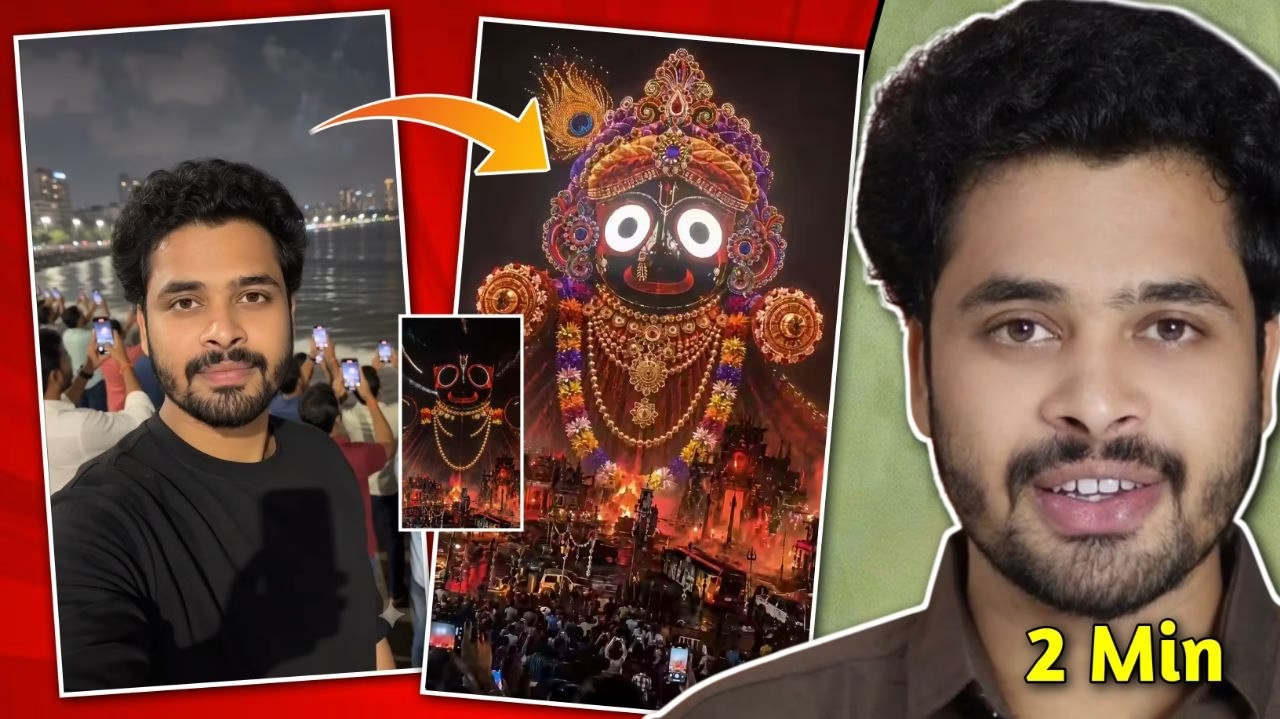
Vlog (Google Gemini Avatar) Overall Style Ultra-realistic handheld iPhone footage of a world-class drone show over a large offshore waterfront at night. The entire scene must look like genuine live smartphone footage. Use Google Gemini Avatar so the person exactly matches my uploaded photo with 100% facial identity, hairstyle, beard, skin tone, and facial structure. I am wearing a plain black shirt and holding my smartphone in selfie mode, silently recording a vlog. I never speak. Natural handheld movement, autofocus breathing, realistic exposure shifts, atmospheric haze, ocean reflections, distant city lights, and a massive cheering crowd recording the show. Everything in the sky is created only by thousands of synchronized physical LED drones. No CGI, holograms, lasers, fireworks, or animation. 0:00–0:02 — Creator Vlog Opening The video begins with my Google Gemini Avatar already standing on the waterfront promenade, wearing a plain black shirt. I hold my smartphone in selfie mode as if filming a vlog. I look toward the camera briefly, then naturally turn my attention toward the sky. I do not speak or make exaggerated expressions. The crowd behind me is excited and filming with their phones. 0:02–0:04 — Drone Swarm Arrival Thousands of individual LED drones begin rising from multiple launch points over the ocean. Their flight paths are clearly visible as they climb into the night sky. The camera naturally pans upward while still keeping part of me in the frame. The crowd reacts with excitement. 0:04–0:08 — Lord Jagannath Formation The drones gradually assemble into a magnificent, perfectly recognizable image of Lord Jagannath. The formation happens progressively from the outline to the eyes, face, crown, ornaments, and decorative details. Every visible light is an individual drone with realistic spacing and synchronized movement. No instant morphing, teleportation, or CGI effects. I silently watch in amazement while continuing to record the drone show. 0:08–0:10 — Divine Finale A radiant golden circular aura made entirely of drones forms behind Lord Jagannath. Above the divine figure, thousands of saffron, white, and golden drones assemble the large centeredtext: “JAI JAGANNATH” The final composition shows me in the foreground filming the spectacular drone show, Lord Jagannath fully formed in the night sky, “JAI JAGANNATH” above Him, realistic ocean reflections, and thousands of cheering spectators recording the unforgettable moment. The camera gently steadies during the final second while maintaining subtle handheld realism. Critical Requirements • Use my uploaded photo as the exact Google Gemini Avatar identity.• Preserve 100% facial features, beard, hairstyle, skin tone, and face shape.• Wear a plain black shirt.• I remain silent throughout the video.• I continuously hold my phone and record in selfie-vlog style.• Lord Jagannath forms only from synchronized physical drones.• Every light visible in the sky is an individual drone.• No CGI, holograms, lasers, fireworks, morphing, or scene cuts.• One uninterrupted handheld smartphone shot with realistic movement.• Ultra-photorealistic 4K cinematic quality.
FAQs
1. Is Google Flow free?
Google Flow offers access based on eligible Google AI subscription plans and supported regions, with some features varying by plan.
2. Can Google Flow create YouTube Shorts?
Yes. It supports vertical video generation suitable for Shorts, Instagram Reels, and TikTok.
3. Does Google Flow use Veo?
Yes. Google Flow is powered by Google’s Veo models for AI video generation.
4. Which niche gives the highest RPM?
Finance, AI software, SaaS, investing, business, and productivity generally offer some of the highest RPM opportunities.
5. Is Google Flow better than Runway?
Both are powerful, but Google Flow’s integration with Veo, Gemini, and AI image generation provides a unified workflow that many creators find advantageous.