


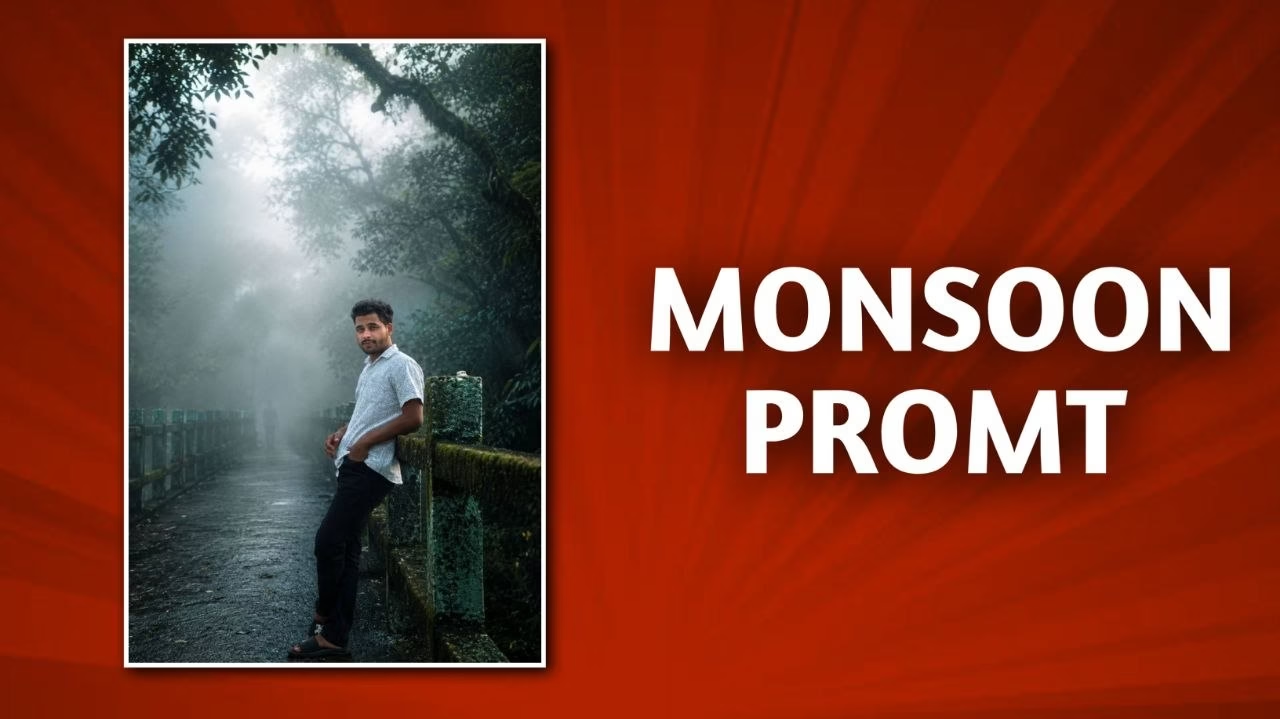

Monsoon AI Photos Going Viral: The Trend Everyone Is Talking About
Every year, the monsoon season transforms ordinary streets, parks, villages, and cities into cinematic landscapes. Rain-soaked roads reflect neon lights, cloudy skies create dramatic moods, and tiny droplets add a magical touch to every frame. In 2026, a new trend has taken social media by storm: Monsoon AI Photos. People are using artificial intelligence tools to create breathtaking rain-themed portraits, dreamy couple photos, cinematic street scenes, and fantasy-style monsoon edits that look straight out of a movie.
What makes this trend so fascinating is that you no longer need a professional camera, expensive editing software, or even a real photoshoot. With the help of AI image generators and editing tools, anyone can turn a simple selfie into a stunning monsoon masterpiece. These images are going viral across Instagram Reels, YouTube Shorts, Facebook, and Pinterest because they combine emotion, aesthetics, and creativity in a way that instantly captures attention.
In this article, you’ll learn why monsoon AI photos are trending, which styles are becoming viral, how creators are making them, the best prompts to use, and practical tips to create scroll-stopping monsoon content that can boost your social media reach.
What Are Monsoon AI Photos?
Monsoon AI photos are digitally generated or AI-enhanced images that feature rainy-season aesthetics. These images often include dramatic clouds, falling rain, wet roads, reflections, umbrellas, traditional outfits, cinematic lighting, and emotional expressions. Instead of capturing these effects with a camera, creators use AI tools to generate them from text prompts or enhance existing photos with rain effects and cinematic edits.
The popularity of this trend comes from its accessibility. A student with a smartphone can create visuals that look like they were shot by a professional photographer. AI tools can add realistic rain, improve lighting, create reflections, and even change the entire background into a dreamy monsoon setting.
Many viral creators are also combining personal selfies with AI-generated backgrounds, making the final result look both realistic and artistic. This blend of authenticity and creativity is one of the biggest reasons the trend has exploded across social platforms.
Why Monsoon AI Photos Are Going Viral
Emotional Appeal of Rain Photography
Rain has always carried a strong emotional connection. It reminds people of memories, romance, travel, chai breaks, music, and peaceful evenings. Monsoon photos naturally create a feeling of nostalgia and comfort, which makes viewers spend more time looking at the image.
AI amplifies these emotions by adding cinematic lighting, dramatic skies, and perfectly timed rain effects. The result feels like a scene from a movie rather than an ordinary photograph.
Social Media Algorithms Love Aesthetic Content
Platforms like Instagram and Pinterest reward content that keeps users engaged. A visually striking monsoon portrait often gets more saves, shares, and comments than a regular photo. The reflective water, moody colors, and cinematic atmosphere instantly grab attention while scrolling.
Creators have also discovered that monsoon-themed Reels and carousel posts tend to perform exceptionally well during the rainy season, making AI-generated monsoon content a powerful growth strategy.
Most Popular Monsoon AI Photo Styles
Cinematic Rain Portraits

These are the most viral style right now. The subject stands in the rain with dramatic lighting, shallow depth of field, and movie-like color grading. Water droplets, reflections, and soft background blur make the image look premium.
Anime Monsoon Edits

Anime-inspired rain scenes are especially popular among younger audiences. These edits feature glowing umbrellas, dreamy skies, and emotional storytelling similar to famous animated films.
Couple Rain Photos

AI-generated couple photos under an umbrella are dominating Instagram. They create a romantic and cinematic vibe that performs extremely well during the monsoon season.
Traditional Indian Monsoon Looks

Many creators are generating portraits featuring sarees, kurtas, village roads, tea stalls, and lush green backgrounds. These images combine Indian cultural aesthetics with modern AI creativity.
How AI Creates Viral Monsoon Photos
AI image generators work by analyzing text descriptions and creating images that match the prompt. For example, if you describe “a cinematic portrait of a man standing in heavy monsoon rain with neon reflections and dramatic lighting”, the AI generates an image that visually represents that scene.
Advanced tools can also edit existing photos. You upload a selfie, and the AI adds rain, changes the background, improves lighting, and applies cinematic color grading. This process takes minutes instead of hours of manual editing.
The biggest advantage is creative freedom. You can create scenes that would be difficult, expensive, or impossible to shoot in real life.
Best AI Prompts for Monsoon Photos
Here are some high-performing prompt ideas:
- Cinematic Portrait: “Ultra realistic cinematic portrait of a young man standing in heavy monsoon rain, wet hair, dramatic lighting, neon reflections on the road, shallow depth of field, 85mm lens, high detail.”
- Indian Monsoon Look: “Beautiful Indian woman in a saree walking through a rainy village road during monsoon, lush greenery, soft natural lighting, realistic raindrops, cinematic photography.”
- Romantic Couple: “Romantic couple under a transparent umbrella during monsoon, city lights reflecting on wet streets, cinematic mood, realistic rain, ultra detailed.”
- Anime Style: “Anime-style monsoon street scene with glowing umbrellas, rainy evening, reflections on wet roads, dreamy atmosphere, highly detailed.”
Viral Monsoon AI Prompt Examples
Top 5 Viral Prompt Styles
Trending

| Style | Viral Potential |
|---|---|
| Cinematic Portrait | Very High |
| Couple Umbrella Photo | Very High |
| Traditional Indian Monsoon | High |
| Anime Rain Scene | High |
| Tea Stall Monsoon Photo | Medium-High |
Tips to Make Your Monsoon AI Photos Look Realistic
Use Natural Lighting Descriptions
Instead of simply writing “rain photo”, describe the lighting. Phrases like “soft cloudy daylight”, “golden evening rain”, or “moody overcast sky” create much more realistic results.
Add Camera Details
Including photography terms such as “85mm lens”, “shallow depth of field”, and “cinematic color grading” often produces more professional-looking images.
Include Rain Interaction
Mention how the rain affects the subject. Wet hair, water droplets on clothes, puddle reflections, and umbrella highlights make the scene feel believable.
Instagram & YouTube Strategies for Viral Reach
Creating a great AI photo is only half the job. Presentation matters just as much.
For Instagram, post carousel images showing the transformation from the original selfie to the AI-generated monsoon version. Add trending monsoon music to Reels and use relevant hashtags such as #MonsoonAI, #RainPhotography, #AIPortrait, and #CinematicEdit.
For YouTube Shorts, create a quick tutorial showing how the AI photo was generated. People love behind-the-scenes content, and these videos often receive strong engagement because viewers want to learn the process.
Common Mistakes to Avoid
- Using too many effects, which makes the image look fake.
- Ignoring lighting consistency.
- Adding unrealistic rain that doesn’t match the scene.
- Over-smoothing faces.
- Using low-resolution source images.
The most viral monsoon AI photos usually look almost real. Subtlety often performs better than excessive editing.
The Future of AI-Generated Seasonal Photography
Monsoon AI photos are likely just the beginning. Seasonal AI photography is expanding into summer beach edits, autumn portraits, winter snow scenes, and festival-themed transformations. As AI tools become more advanced, creating professional-quality images will become even easier.
Creators who learn prompt writing and visual storytelling now will have a major advantage in the growing AI content economy. Brands, influencers, and content creators are already using AI-generated seasonal visuals for marketing campaigns and social media growth.
PROMPT
Transform this image into a breathtaking ultra-realistic foggy forest masterpiece. Add dense natural white fog covering the entire environment, creating a mysterious and cinematic atmosphere.
Apply rich forest-inspired color grading with deep emerald green, dark teal, moss green, and earthy brown tones.
Enhance the trees, foliage, and background elements to resemble a lush enchanted forest hidden in the mist.
Introduce soft volumetric light rays subtly penetrating through the fog, creating depth and realism.
Increase overall image quality to ultra-high-definition 4K
resolution with razor-sharp details, HDR enhancement, realistic textures, balanced contrast, and natural color harmony. Impreva shadows, highlights, and dynamic range while maintaining a realistic appearance. Add a moody woodland aesthetic, dreamy fog layers, atmospheric perspective, and professional cinematir photography grading. The final result should look like a premium DSLR forest photograph captured during a cold misty morning, with ultra-realistic details, immersive depth, soft natural lighting, and stunning visual quality. Style:
Cinematic Forest Photography,
84
Moody Nature, Dense Fog Weather, Volumetric Lighting, HDR, Ultra Realistic, Professional Color Grading, 4K Quality,
DSLR Shot, Atmospheric Depth, Photorealistic.
Conclusion
Monsoon AI photos are going viral because they combine emotion, aesthetics, and technology in a way that feels both magical and accessible. Anyone with a smartphone can now create cinematic rain portraits, romantic couple shots, anime-style monsoon scenes, and traditional Indian rainy-season visuals that capture attention instantly.
The secret is not just the AI tool itself—it is the prompt, the mood, and the storytelling. Focus on realistic lighting, emotional atmosphere, and cinematic details. Whether you’re growing an Instagram page, creating YouTube Shorts, or simply having fun with AI art, monsoon-themed content offers enormous creative potential.
If you start experimenting now, your next viral post might be just one rainy prompt away.
FAQs
1. Which AI tool is best for creating monsoon photos?
Many modern AI image generators can create monsoon photos effectively. Choose one that supports detailed text prompts and photo editing features.
2. Can I create monsoon AI photos from my selfie?
Yes. Most AI editing tools allow you to upload a selfie and transform it into a cinematic rainy-season portrait.
3. Why do monsoon AI photos get more engagement?
Rainy visuals create strong emotions and aesthetic appeal, which encourages users to like, save, share, and comment.
4. Are monsoon AI photos suitable for Instagram Reels?
Absolutely. They work especially well in before-and-after transformation videos and cinematic slideshow Reels.
5. What makes a monsoon AI photo look realistic?
Consistent lighting, natural rain effects, wet textures, reflections, and detailed prompts make the biggest difference.
🔍 Want to find the best keywords and rank this article faster? Try the #1 SEO & AI visibility toolkit free for 14 Days. Track your keyword rankings, audit your site, and monitor your AI search visibility on ChatGPT, Gemini & Google AI Overviews
✨ Get better articles, faster. This prompt is powerful. But Pro Article Writer takes it further — AI humanizer, SEO tools, full editor, one-click options, and more control all in one place. Try it free →
If this prompt helped you, please leave a review — it keeps this prompt ranked #1.


